Upload Terms of Use
The Terms of Use agreement module enables you to perform these actions:
- Upload a new or replace an existing Terms of Use of Service agreement
- Delete the current Terms of Use agreement
- Download the current Terms of Use agreement
A screen capture of the Terms of Use agreements table is shown here.
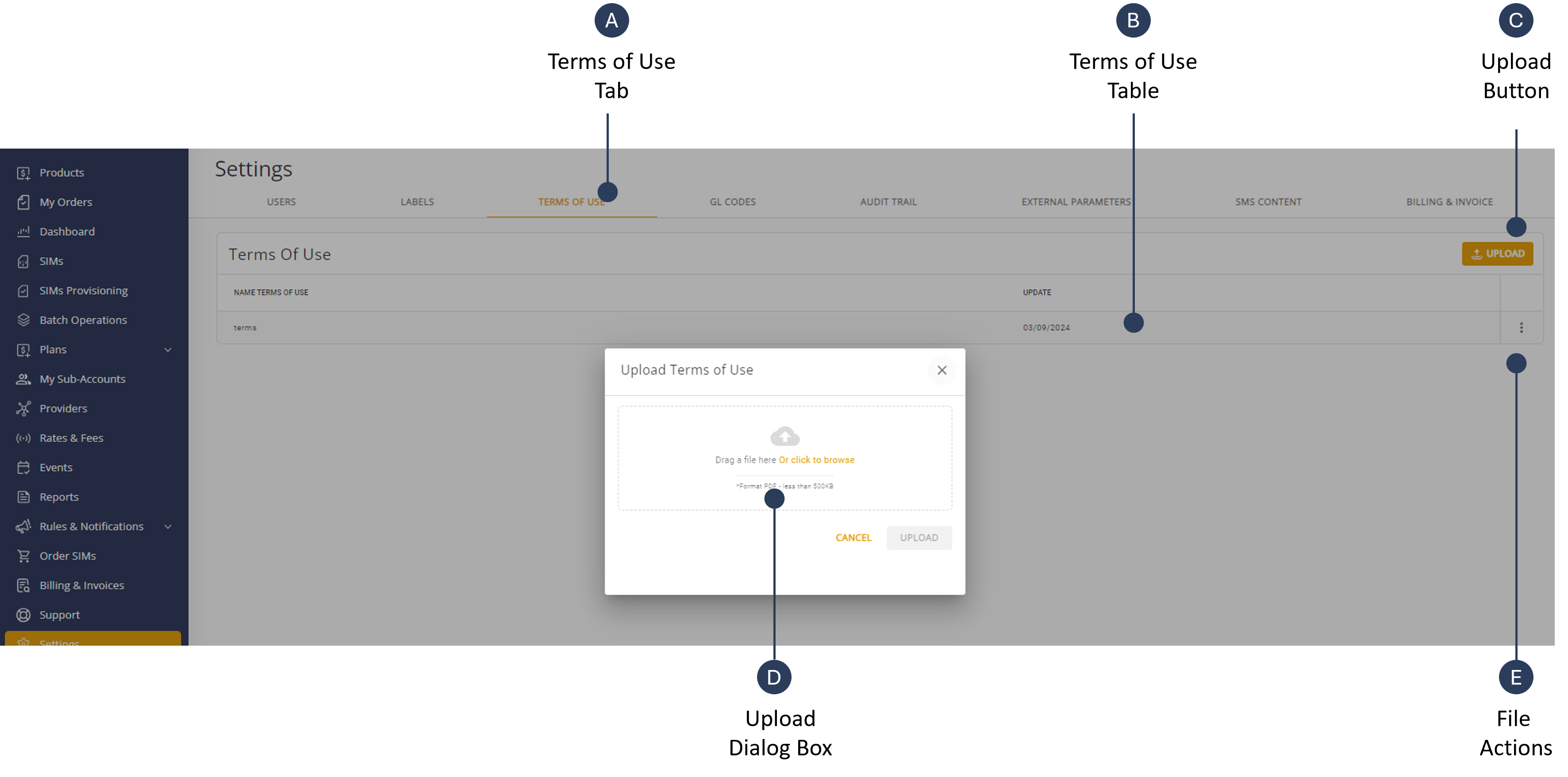
Upload Terms Of Use Agreement
When you upload a new Terms of Use agreement, all your new and existing sub-account users are required to the accept the new terms.
NOTE: You are required to upload the Terms of Use agreement in PDF format.
To upload a new Terms of Use agreement, do these steps:
- Select Settings from the navigation sidebar menu.
- Select the Terms of Use tab.
- Click Upload to display the upload message box.
- Click Yes to confirm overwrite of the existing Terms of Use agreement.
Note: If this is the first time you are uploading a Terms of Use agreement, the overwrite message is not displayed.
- Place your PDF file in the Upload Terms of Use dialog box.
- Click Upload to replace the existing file. The file is uploaded and a Success message is displayed at the bottom of the page.
IMPORTANT: Make sure all your sub-account users, both new and existing) accept the new Terms of Use agreement.Download
Download Terms of Use Agreement
To download the Terms of Use agreement, do these steps
- Select Settings from the navigation sidebar menu.
- Select the Terms of Use tab.
- Click the Actions control located on the right side of the table row.
- Click Download to save a copy of the PDF file to your computer.
Delete Terms of Use Agreement
To delete a Terms of Use agreement, do these steps:
- Select Settings from the navigation sidebar menu.
- Select the Terms of Use tab.
- Click the Actions control located on the right side of the table row.
- Click Delete to remove the PDF file from the table.
- Click Yes to confirm the delete operation.