Create External Parameter
An external parameter is a user-defined identifier that is mapped to platform entities such as Accounts, SIMs, Plans, Products and Packages. External parameters play a crucial role in organizing and categorizing accounts, plans and assigned SIMs.
A screen capture of the Parameter page is shown here.
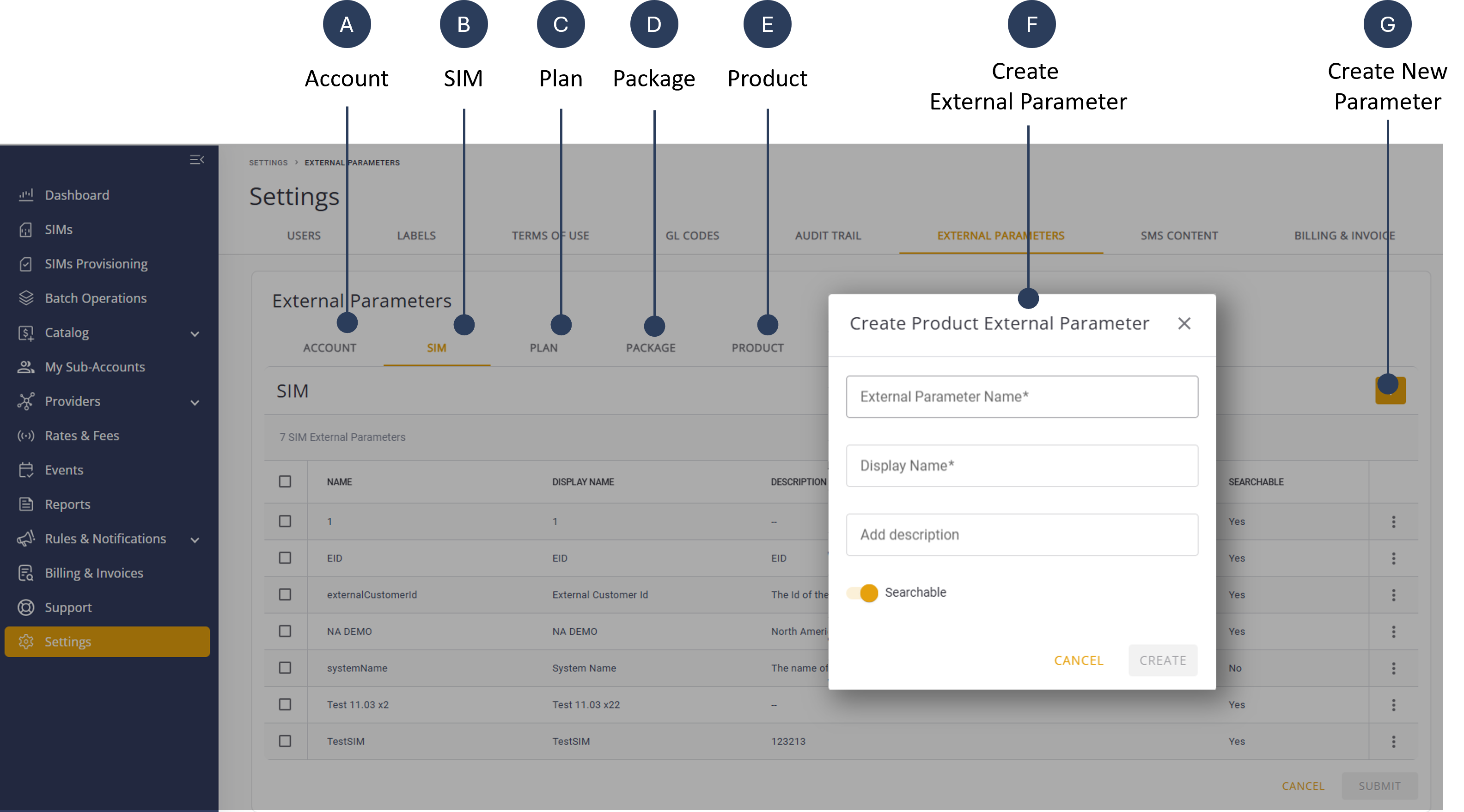
NOTE: Select the appropriate sub-category in Step 3 to create an external parameter.
To create an External Parameter, do these steps:
- Select Settings from the sidebar navigation menu.
- Select the External Parameters tab to display the External Parameters table.
- Select one of the appropriate sub-categories:
- Account
- SIM
- Plan
- Product
- Package
- Click the + sign on the header. The Create Account External Parameter dialog box is displayed.
- Type an External Parameter Name*.
- Type a Display Name*for the external parameter.
- Add a description for the external parameter (optional)
- Check the Searchable option to display the parameter in the system search results..
- Click Create to update the Account External Parameter table.
- Click Submit to update system.