Export SIM Data
This feature enables users to export SIM table data to an external CSV file. There are two options to export the data displayed in the SIMs table:
- Export Displayed Columns: This option enables users to export data from the table containing only the columns currently visible on the user interface. It allows users to tailor their exports to include only the information currently displayed in the table.
- Export Displayed and Hidden Columns: With this option, users can export data from the table, including both the columns currently displayed on the user interface and any hidden columns. It provides users with a comprehensive export of all available data columns, ensuring no information is omitted from the exported dataset.
If the SIMs table has a larger number of SIMs than can be exported into a single file an appropriate message is displayed. You need to refilter the SIMs table to obtain finer granularity that reduces the table contents.
CSV File Attributes
The exported file name has the following format: SIM_export_yyyymmdd.csv
NOTE: The exported filename contains the time stamp of the generated CSV file, for example: SIM_export_20220201.csv
TIP: The CSV file includes both the SIM identifiers (ICCID, EIDs, IMSIs) and UUIDs and can be associated with other actions, such as file-based bulk operations and API calls.
The CSV file includes both the SIM identifiers (ICCID, EIDs, IMSIs) and UUIDs and can be associated with other actions, such as file-based bulk operations and API calls. The SIMs in the CVS file are identified by the SIM name, the account name and billing plan. If the SIMs listed in the SIMs table have been mapped to external customer IDs, these customer IDs will be incorporated in the CSV file.
Export Procedure
To export the SIMs table contents to a CSV file do these steps:
- Select SIMs from the sidebar menu.
- Click Customize Columns and select the columns you want to display in the SIMs table.
- Click Save to update the SIMs table.
- Click Export Options and select one of these options:
- Export Displayed Columns
- Export Displayed and Hidden Columns.
- Click Export to download csv file.
Example CSV File
Here is an example of the exported CSV file.
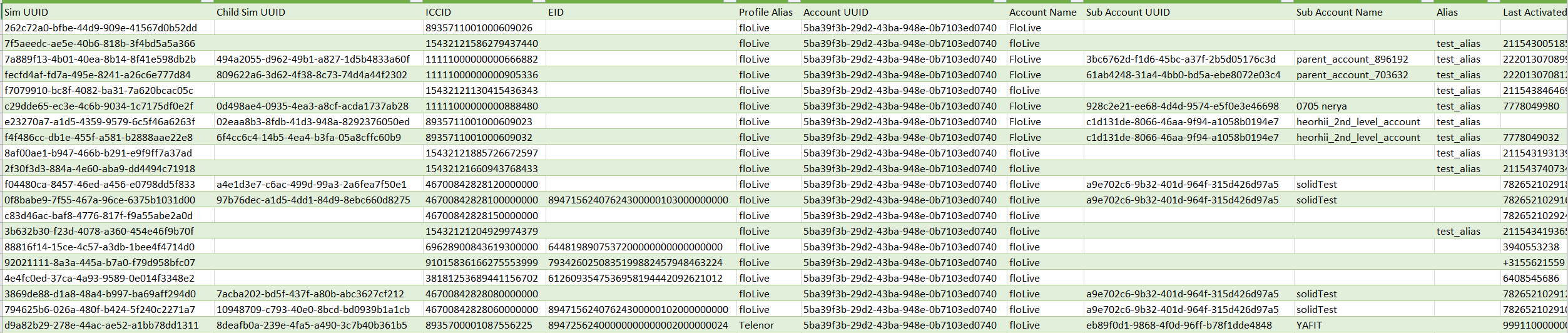
NOTE: The cell delimiter for lists of values within a cell is a comma (,).
Description of CSV Information
A description of the CSV information is shown in this table.
| Attribute | Description | ||||||||||||||||||||||||||||||||||||||||||||||||||||||||||||||||||||||||
|---|---|---|---|---|---|---|---|---|---|---|---|---|---|---|---|---|---|---|---|---|---|---|---|---|---|---|---|---|---|---|---|---|---|---|---|---|---|---|---|---|---|---|---|---|---|---|---|---|---|---|---|---|---|---|---|---|---|---|---|---|---|---|---|---|---|---|---|---|---|---|---|---|---|
| SIM UUID | The UUID (Universal Unique Identifier) of this SIM. | ||||||||||||||||||||||||||||||||||||||||||||||||||||||||||||||||||||||||
| Child Sim UUID | The child subscriber UUID of this SIM. | ||||||||||||||||||||||||||||||||||||||||||||||||||||||||||||||||||||||||
| ICCID | The SIM ICCID (Integrated Circuit Card Identifier) serial number. | ||||||||||||||||||||||||||||||||||||||||||||||||||||||||||||||||||||||||
| EID | [eUICC SIM] The EID ID, which identifies this eUICC SIM (or eSIM). An empty cell indicates that the SIM is a regular UICC SIM. | ||||||||||||||||||||||||||||||||||||||||||||||||||||||||||||||||||||||||
| Profile Alias | [eUICC SIM] Applies to this EID. which may have several embedded profiles with different ICCIDs, only one of which is active. The profile alias of the currently active profile of this EID (eUICC SIM). | ||||||||||||||||||||||||||||||||||||||||||||||||||||||||||||||||||||||||
| Account UUID | The UUID of the account that this SIM belongs to. | ||||||||||||||||||||||||||||||||||||||||||||||||||||||||||||||||||||||||
| Account Name | The full account name of this SIM. | ||||||||||||||||||||||||||||||||||||||||||||||||||||||||||||||||||||||||
| Sub Account UUID | The UUID of the sub account that this SIM belongs to. | ||||||||||||||||||||||||||||||||||||||||||||||||||||||||||||||||||||||||
| Sub Account Name | The full account name of this SIM. | ||||||||||||||||||||||||||||||||||||||||||||||||||||||||||||||||||||||||
| Alias | The alias (if any) applied to the account that this SIM belongs to. | ||||||||||||||||||||||||||||||||||||||||||||||||||||||||||||||||||||||||
| Last Activated MSISDN | The last MSISDN that was activated by this SIM (member of MSISDN/IMSI pairing). | ||||||||||||||||||||||||||||||||||||||||||||||||||||||||||||||||||||||||
| MSISDNs | The list of MSISDNs that have been assigned to this SIM. | ||||||||||||||||||||||||||||||||||||||||||||||||||||||||||||||||||||||||
| Last Activated IMSI | The last IMSI that was activated by this SIM (member of MSISDN/IMSI pairing). | ||||||||||||||||||||||||||||||||||||||||||||||||||||||||||||||||||||||||
| IMSIs | The list of IMSIs that have been assigned to this SIM. | ||||||||||||||||||||||||||||||||||||||||||||||||||||||||||||||||||||||||
| IMEI | The IMEI assigned to this GSM SIM. | ||||||||||||||||||||||||||||||||||||||||||||||||||||||||||||||||||||||||
| IP Address | Last allocated IP address. | ||||||||||||||||||||||||||||||||||||||||||||||||||||||||||||||||||||||||
| SIM Status UUID | The SIM’s status instance UUID. | ||||||||||||||||||||||||||||||||||||||||||||||||||||||||||||||||||||||||
| SIM Status | SIM Status: ACTIVE, SUSPENDED. | ||||||||||||||||||||||||||||||||||||||||||||||||||||||||||||||||||||||||
| Sell Plan UUID | The UUIDs of the Sell Billing Plan that the SIM subscriber is paying for. | ||||||||||||||||||||||||||||||||||||||||||||||||||||||||||||||||||||||||
| Buy Plan UUID | The UUIDs of the Buy Billing Plan (created by the Parent account) that the SIM subscriber is paying for. | ||||||||||||||||||||||||||||||||||||||||||||||||||||||||||||||||||||||||
| Sell Plan Name | The names of the Sell Billing Plans assigned to this SIM. | ||||||||||||||||||||||||||||||||||||||||||||||||||||||||||||||||||||||||
| Buy Plan Name | The name of the Buy Billing Plan assigned to the SIM. | ||||||||||||||||||||||||||||||||||||||||||||||||||||||||||||||||||||||||
| Sell Plan Priority | The Sell Plans current assigned priorities (used for Multi Plans) . | ||||||||||||||||||||||||||||||||||||||||||||||||||||||||||||||||||||||||
| Buy Plan Priority | The Buy Plans current assigned priorities (used for Multi Plans). | ||||||||||||||||||||||||||||||||||||||||||||||||||||||||||||||||||||||||
| Sell Plan Data usage | The total Sell-Plan Data usage of this SIM at the moment that the CSV file was created. | ||||||||||||||||||||||||||||||||||||||||||||||||||||||||||||||||||||||||
| Sell Plan SMS usage | The total Sell-Plan SMS usage of this SIM at the moment that the CSV file was created. | ||||||||||||||||||||||||||||||||||||||||||||||||||||||||||||||||||||||||
| Buy Plan Data usage | The total Buy-Plan Data usage of this SIM at the moment that the CSV file was created. | ||||||||||||||||||||||||||||||||||||||||||||||||||||||||||||||||||||||||
| Buy Plan SMS usage | The total Buy-Plan SMS usage of this SIM at the moment that the CSV file was created. | ||||||||||||||||||||||||||||||||||||||||||||||||||||||||||||||||||||||||
| Country | The country where the SIM was last connected. | ||||||||||||||||||||||||||||||||||||||||||||||||||||||||||||||||||||||||
| Labels | User labels assigned to this SIM. | ||||||||||||||||||||||||||||||||||||||||||||||||||||||||||||||||||||||||
| System Labels | System labels assigned to this SIM. | ||||||||||||||||||||||||||||||||||||||||||||||||||||||||||||||||||||||||
| Last connected time | The last time this SIM connected to the network at the moment the CSV file was created. | ||||||||||||||||||||||||||||||||||||||||||||||||||||||||||||||||||||||||
| RAT | The Radio Access Technology used by this SIM at the time the CSV file was created.
|
||||||||||||||||||||||||||||||||||||||||||||||||||||||||||||||||||||||||
| Connected operator | The ID code of this SIM’s operator. | ||||||||||||||||||||||||||||||||||||||||||||||||||||||||||||||||||||||||
| Last Location | The last location recorded of this SIM at the moment the CSV file was created.The coordinates comprise four values separated by a slash, as follows:MCC/MNC/LAC or TAC/CellID or SAC or ENB or RAC For the fourth value, the order is important:
|
||||||||||||||||||||||||||||||||||||||||||||||||||||||||||||||||||||||||
| External parameters | The list of External Parameters names and values assigned to the SIM. | ||||||||||||||||||||||||||||||||||||||||||||||||||||||||||||||||||||||||
| <time period>Data Usage | The SIM’s current data usage information. The SIMs data usage shows the usage in three columns:
|
||||||||||||||||||||||||||||||||||||||||||||||||||||||||||||||||||||||||
| <time period>SMS Usage | The SIM’s current SMS usage information. | ||||||||||||||||||||||||||||||||||||||||||||||||||||||||||||||||||||||||
| Activation Type | eUICC Activation Type (QR Poster, QR Single or IoT Profile) | ||||||||||||||||||||||||||||||||||||||||||||||||||||||||||||||||||||||||
| Applet Version | Version number of the applet on the SIM card. | ||||||||||||||||||||||||||||||||||||||||||||||||||||||||||||||||||||||||
| Element | Type of SIM (Plastic, Embedded, Integrated, Software, or Profile Only). | ||||||||||||||||||||||||||||||||||||||||||||||||||||||||||||||||||||||||
| Form Factor | Physical size/format of the SIM (Plastic: 2FF/Triple Cut; Embedded: MFF2/MFFXS/USON‑8). | ||||||||||||||||||||||||||||||||||||||||||||||||||||||||||||||||||||||||
| Grade | Environmental/durability rating (Default, Industrial, Automotive). | ||||||||||||||||||||||||||||||||||||||||||||||||||||||||||||||||||||||||
| Manufacturer | Vendor identifier for the SIM card (numeric IDs map to specific companies). | ||||||||||||||||||||||||||||||||||||||||||||||||||||||||||||||||||||||||
| Multi IMSI | Indicates whether the profile (ICCID) contains multiple IMSIs (Yes/No). | ||||||||||||||||||||||||||||||||||||||||||||||||||||||||||||||||||||||||
| SIM Type | OS installed on the secure element (e.g., UICC, eUICC Consumer/IoT/Constrained IoT). |