Usage Charge Comparison
This report (a.k.a. Customer Usage Charge Comparison) helps you to compare costs, charges, and margins across your customers, countries, and networks. The report uses connectivity usage data from child accounts and is generated for one sub-account at a time. A separate report is produced for each account.
NOTE:This report supports specific customer workflows and may not be visible to all users. To learn more or request access, contact your floLIVE support representative.
A screen capture of the Customer Usage Charge Comparison report is shown here.
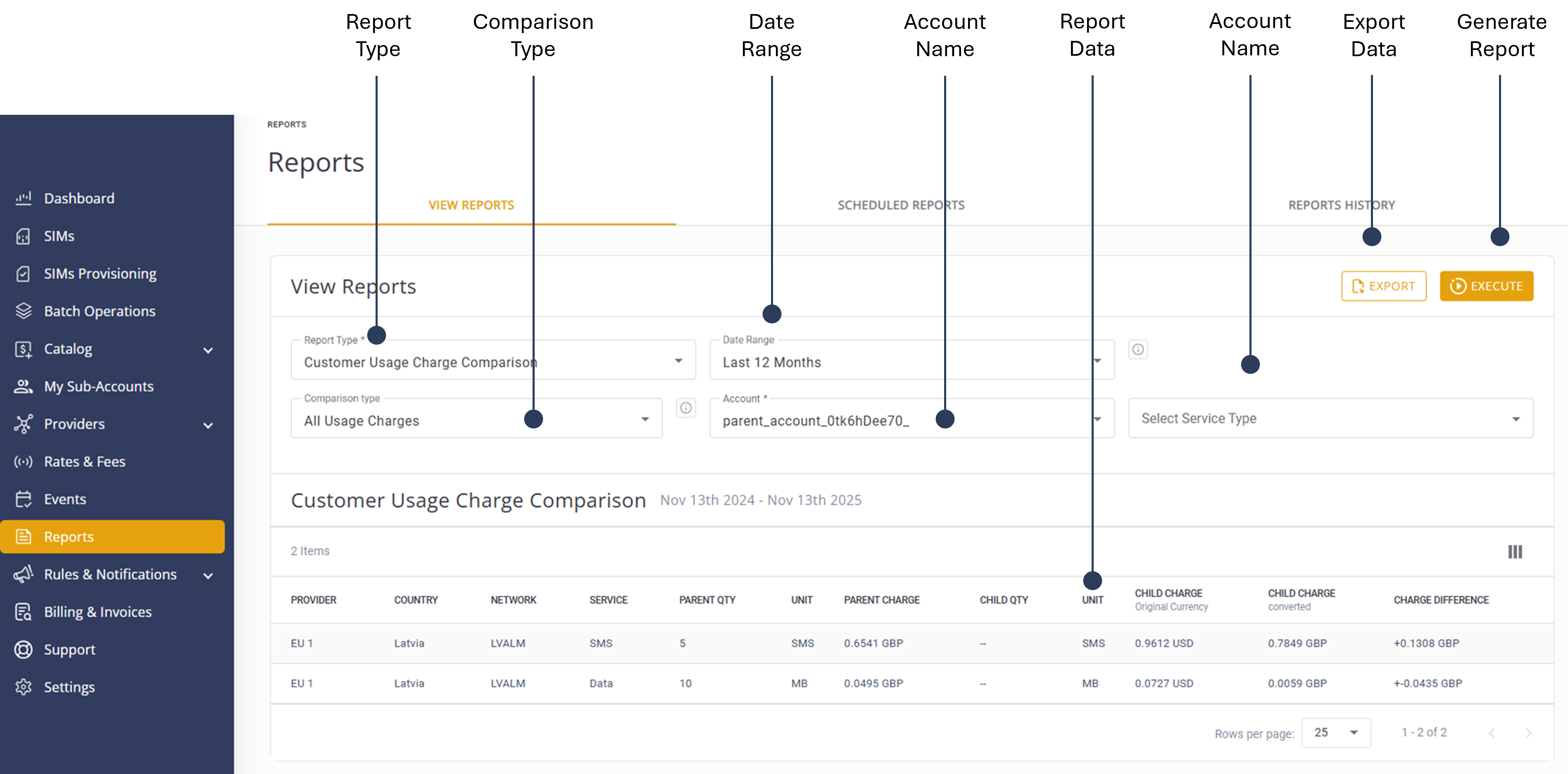
To generate a Customer Usage Charge Comparison report, do these steps:
- Select Reports from the sidebar Menu.
- Select the View Reports tab.
- Go to Report Typeand select Customer Usage Charge Comparison from the list.
- Select a Comparison Typeoption:
- Post Paid Usage Charges: Includes only Postpaid Rate and Custom Rate plan types. Aggregated charges are shown without detailed usage breakdown.
All Usage Charges: Includes all plan types. When mixed plan types are involved, aggregated charges show the total quantity and charge without detailed breakdown.
- Select an appropriate Date Range.
- Select the appropriate Account.
- Select a Service Typeoption:
- None
- Data
- SMS
- Voice
- Click Execute to generate the report.
- Click Export to download the report in .csv format.
TIP: To edit the report, modify the report filters and click Execute again.
A description of the report parameters is provided in this table.
| Attribute | Description |
|---|---|
| Provider | The service provider responsible for the connectivity services. |
| Country | The geographic location where the service is utilized, reflecting regional usage. |
| Network | The specific network or platform through which the connectivity service operates. |
| Service | The type of service being reported, such as Data, SMS, or Voice. This parameter is crucial for distinguishing between different service usages. |
| Parent Quantity | The amount of service (e.g. data or time) consumed by the parent account. This helps track the overall usage attributed to the main account. |
| Child Quantity | The corresponding amount of service consumed by sub-accounts under the parent account. This allows for detailed analysis of usage distribution. |
| Unit | The measurement unit applicable to the service type, such as MB for data or minutes for voice. |
| Child Charge (Original Currency) | The charges incurred by sub-accounts, presented in the original currency used before conversion. |
| Child Charge (Converted) |
The same charges as above, but converted into the parent |
| Charge Difference | The calculated difference between the original and converted charges, highlighting any discrepancies due to currency conversion or other factors. |