Set Fee for Multiple Sub-Accounts
You can set Access Fees and Surcharges for multiple sub-accounts in single action to align your billing with the various charges of different IMSI providers and network operators.
for your sub-accounts .
IMPORTANT: The default value for Access Fees and Surcharges is zero (that is no-charge.). This means you need to set the price and activate these fees to take effect for each of your sub-accounts.
To set the the Access Fee or Surcharge for multiple sub-accounts, do these steps.
- Select Rates & Fees from the sidebar menu.
- Click the Fees tab and select the Fee Type:
- Surcharge
- Access Fee per IMSI
- Select an My Fees from the list of accounts.
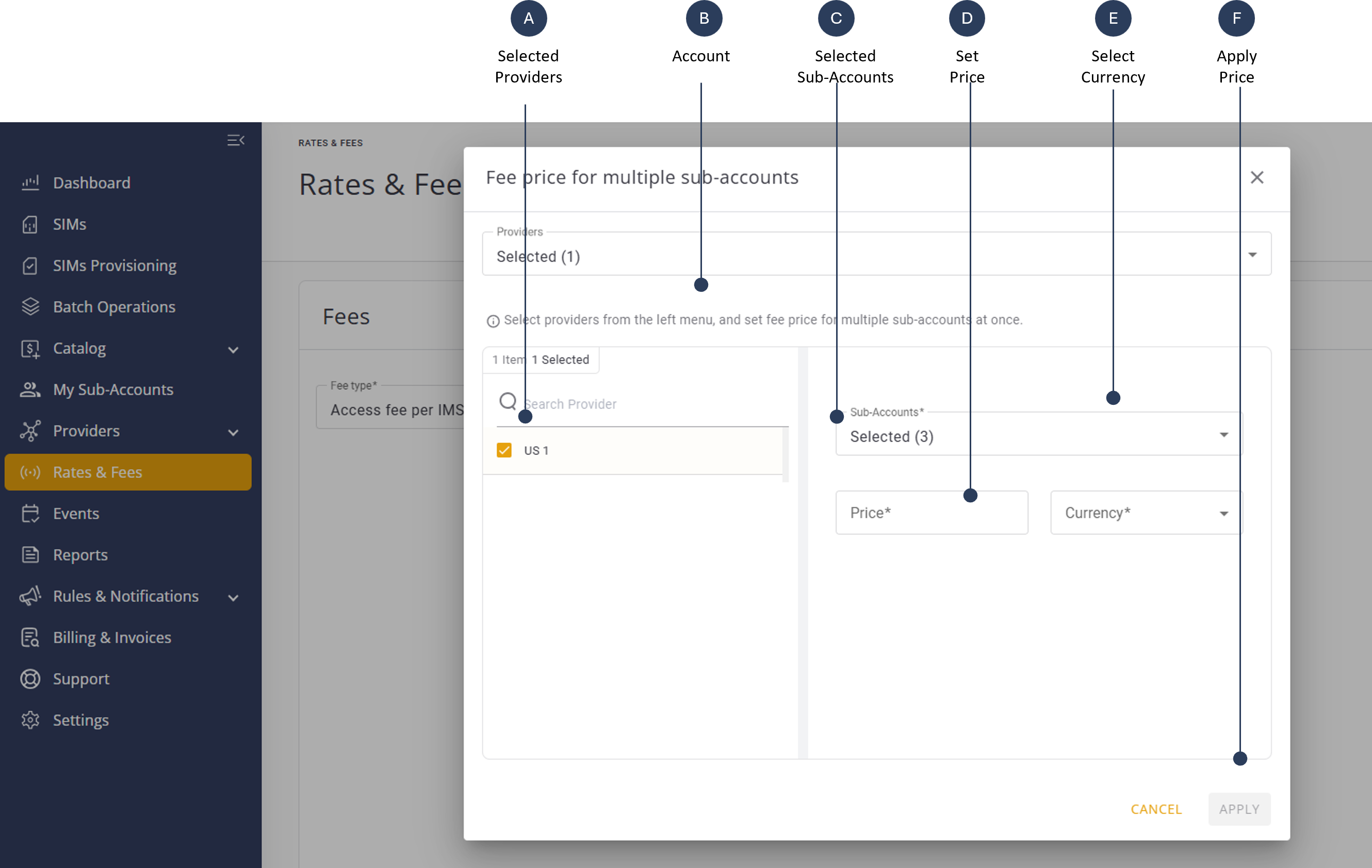
- Go to the top right of the page and click Fee Price for Multiple Sub-Accounts. The Set Fee for Multiple Accounts dialog box is displayed.
- Select one of more Providers from the list.
- Check the appropriate providers.
- Select on or more Sub-Accounts
- Specify the Price for the selected providers and accounts.
- Select the price Currency.
- Click Apply to update the Fees table. The new fee is now updated for the selected accounts.
An example screen capture of the Set Fee for Multiple Accounts dialog box is shown here.