Access Fees and Surcharges
The floLIVE CMP supports two types of network fees:
- Access Fee: A monthly payment for the use of an IMSI provider when a an active IMSI connects to a network.
- Surcharge Fee: An additional monthly fee on top of the Access Fee. A surcharge fee may be required when connecting to specific networks.
A description of these fees is provided in this table.
| Type of Fee | Description |
|---|---|
| Access Fee | The Access Fee is charged each month when an IMSI connects to the network. The fee amount may vary depending on the IMSI Service Provider. It is billed once per calendar month if the IMSI connects during that period. If the IMSI does not connect for the full calendar month, then no fee is charged. |
| Surcharge Fee | A Surcharge Fee is an extra charge imposed by network providers, which may vary by country and network provider. It is billed monthly and can differ depending on the specific network or geographic location. |
Each Access Fee or Surcharge has a Cost and a Price.
- Cost: This is the amount you pay to your parent account for the use of an IMSI Provider.
- Price: This is the amount you charge your sub-accounts when they use the network service.
How to Charge Access Fees
An account can distribute, or transfer, the costs of the Access Fee and Surcharge Fee across all its associated sub-accounts. This feature allows for consolidated management of fees, making it easier to allocate charges for a large number of accounts. The transfer of costs can be performed either for a single sub-account or for multiple sub-accounts simultaneously through a single operation.
The types of Access Fee Charge options are described in this table.
| Access Charge Type | Description |
| Active IMSI Fee | Charges apply for each IMSI used monthly, with fees varying by provider. |
| Active SIM Fee | A fee is charged for every active SIM with connected IMSIs during the month. Fees may vary based on the number of IMSIs. |
| Parent Account Control | Parent accounts can determine which Access Fee type applies to sub-accounts and support bulk operations for efficient management. |
| Zero-Cost Option | SIMs can be assigned to a zero-cost Access Fee type, suitable for fixed monthly billing plans. |
IMPORTANT: Accounts can incur Access Fees based on either "Active SIM" or "Active IMSI", but not both.
A screen capture of the Access Fee page is shown here:
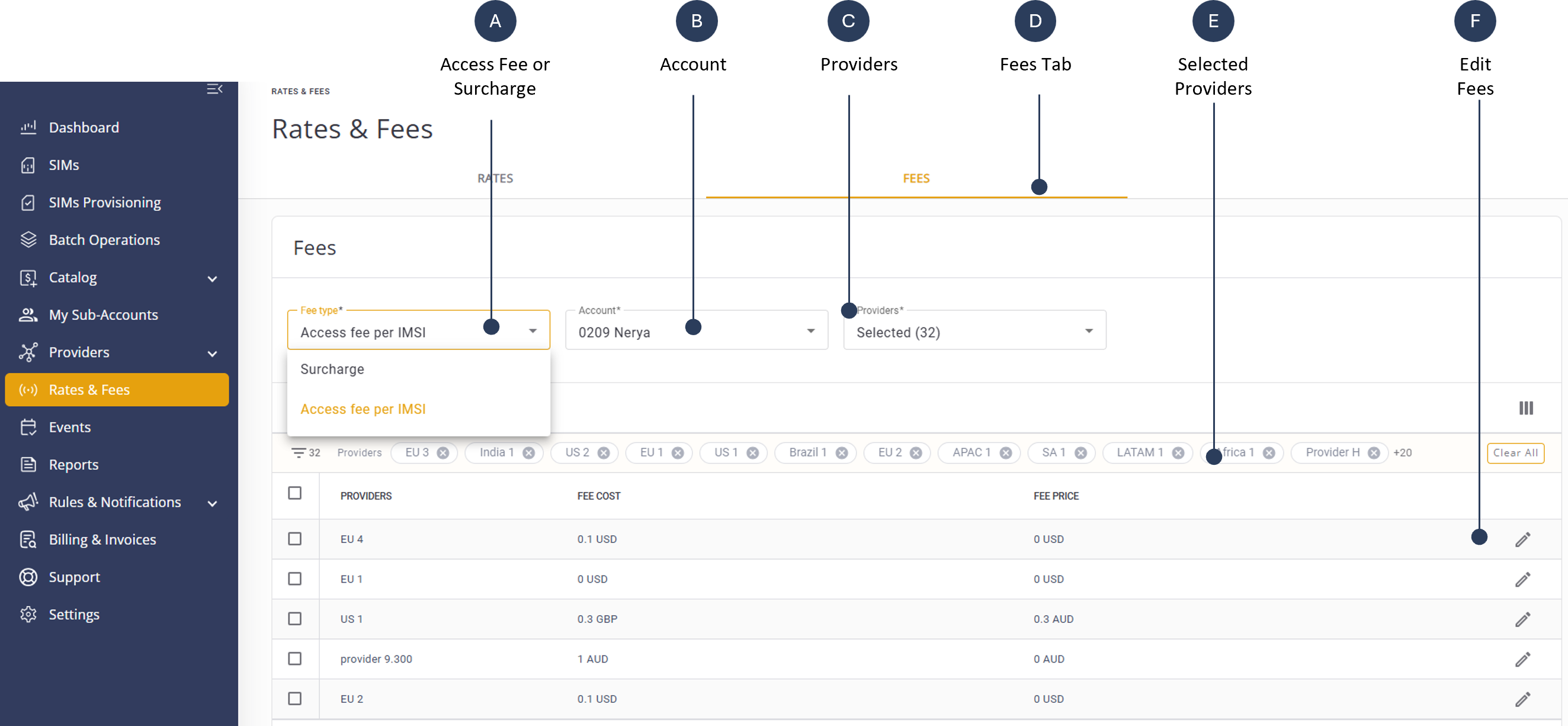
A description of the key features is provided in this table:
| Label Name | Description |
|---|---|
| Access Fee or Surcharge | Choose between setting Access Fees or Surcharge Fees for the account. |
| Account | Specify the account for which the fee settings are being configured. Select "My Fees" to view your account fees costs |
| Providers | Select the network providers associated with the account. |
| Fees Tab | Navigate to the section where fees are managed and configured. |
| Selected Providers | Display the list of providers currently selected for fee configuration. |
| Edit Fees | Options to modify or set new fees for the selected accounts and providers. |