Provider Management
Provider management refers to the definition and update of existing system providers that handle a range of IMSIs (provided by IMSI suppliers). The configuration of a new Provider requires that you specify and maintain a set of PLMNs that are allowed for use by that specific provider.
An overview of the Provider Management configuration process is shown here.
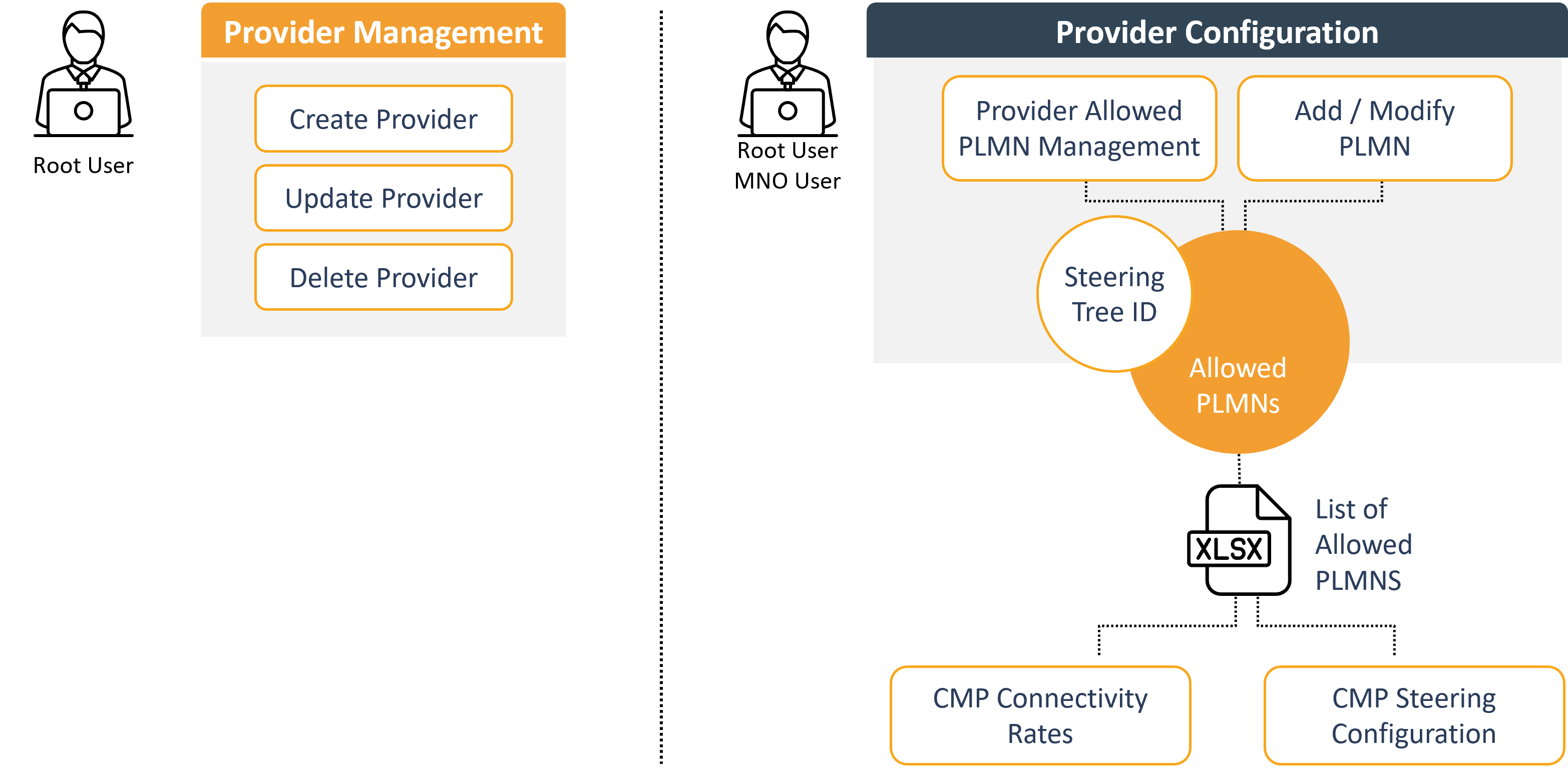
EXAMPLE: Lets assume that Provider A supplies floLIVE with a range of roaming networks that can be utilized. floLIVE will then choose specific networks from this range to incorporate into its steering configurations. Essentially, floLIVE will select subsets of the networks that Provider A has established agreements with to deliver services to its customers. Based on this list of permitted networks, root and MNO users will have the ability to create “steering trees”. Each steering tree is basically a subset of the permitted list.
NOTE: You need Admin permissions to access the Provider module features.
Guidelines
The Providers module enables you to assign (IMSI) providers to sub-accounts (customers) or to detach providers from a sub-account.
These guidelines explain how the Provider Management works.
- The Parent account of a target sub-account owns and manages all available providers.
- Allocation of all providers is at the discretion of the Parent account. The Parent account can allocate any or all providers to each one of its sub-accounts.
- Each account can allocate only those providers allocated to it by its Parent account to its child accounts.
- When a new provider is added to the system, it is not automatically added to existing sub-accounts.
- When a new provider is added, you need to allocate it to one or more existing sub-accounts (refer to Allocate Providers to Sub-Accounts).
- A newly created sub-account will, by default, be allocated all its Parent account's available providers.
IMPORTANT: A provider that is allocated to a sub-account cannot be de-allocated from that sub-account by its Parent account until the sub-account de-allocates that provider from its sub-accounts.
Upload Data to CMP Portal
The Allowed PLMN list is uploaded to the CMP portal via an MS Excel file. This file includes all permitted PLMNs and is utilized in two main contexts:
- CMP Connectivity Rates Configuration
- CMP Steering Configuration.
When configured by the CMP root user, some PLMNs may be automatically blocked, often due to pricing considerations. Any blocked PLMN will be excluded from the permitted list. Conversely, all remaining allowed PLMNs, categorized by network type, will be included in the configurations for 3G and 4G steering setups.
Extended Provider Configuration
To support customer needs, two configuration options are available for managing PLMN lists:
- Account-Allowed PLMNs: Specific customers can have additional networks added to their permitted PLMN list beyond the default options.
- Account-Forbidden PLMNs: Certain networks can be excluded from an account configuration, allowing customization of the PLMN list based on individual account needs.
The Extended Provider Configuration options are shown in this diagram.
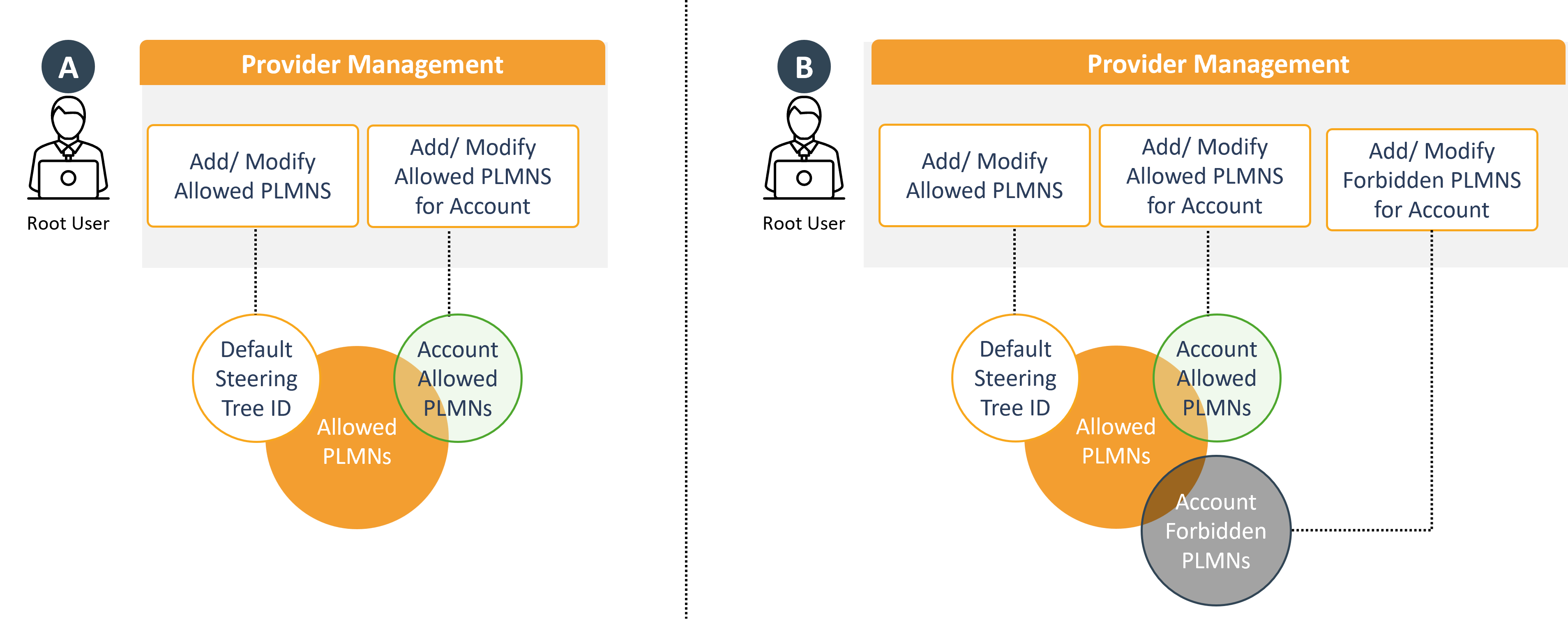
EXAMPLE: Service providers may sometimes want to restrict service access to specific regions. Lets assume a customer requires service solely within the United States while the European provider offers global access. In this use case, a specialized configuration is necessary. By default, the provider allowed PLMN list includes all locations. To enable US-only service, forbidden PLMNs must be configured by removing all non-US locations from the allowed PLMN tree. When this configuration is complete, the account will operate solely within the defined US-focused steering, ensuring compliance with regional service requirements while allowing tailored service offerings.