Modify Rates of a Fixed Rate Plan
You can modify the rates of a Fixed Plan Rate directly from the Plan Details page. Modifications can only be made to rates that have already been configured. For example, if a Fixed Plan Rate includes both Data and SMS rates, you can modify both. However, if your Fixed Rate Plan specifies only a Data rate and does not include an SMS rate, you can modify the Data rate but will not be able to add an SMS fixed rate.
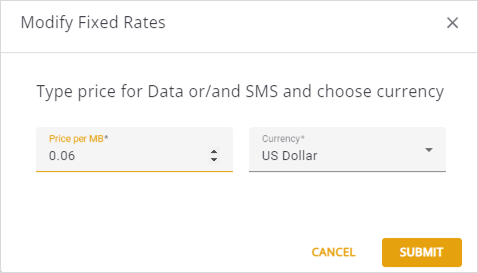
A screen capture of the Modify Fixed Rate dialog box is shown here.
To update the rates of a Fixed Plan Rate, do these steps:
- Select Catalog |Plans from the Navigation sidebar.
- Select the Regular Plans tab. Click the appropriate Plan Rate to display the plan details page.
- Select the Plan Details tab.
- Click the Edit icon to display the Modify Fixed Rate dialog box.
- Update these fields:
- Price per MB
- Currency
- Click Submit to update the Plan Rate.