Create Customized Plan Rate
Plan Rates can be customized based on data uploaded from an Excel file. SIMs attached to this plan are restricted to the countries, operators, and PLMNs listed in the file.
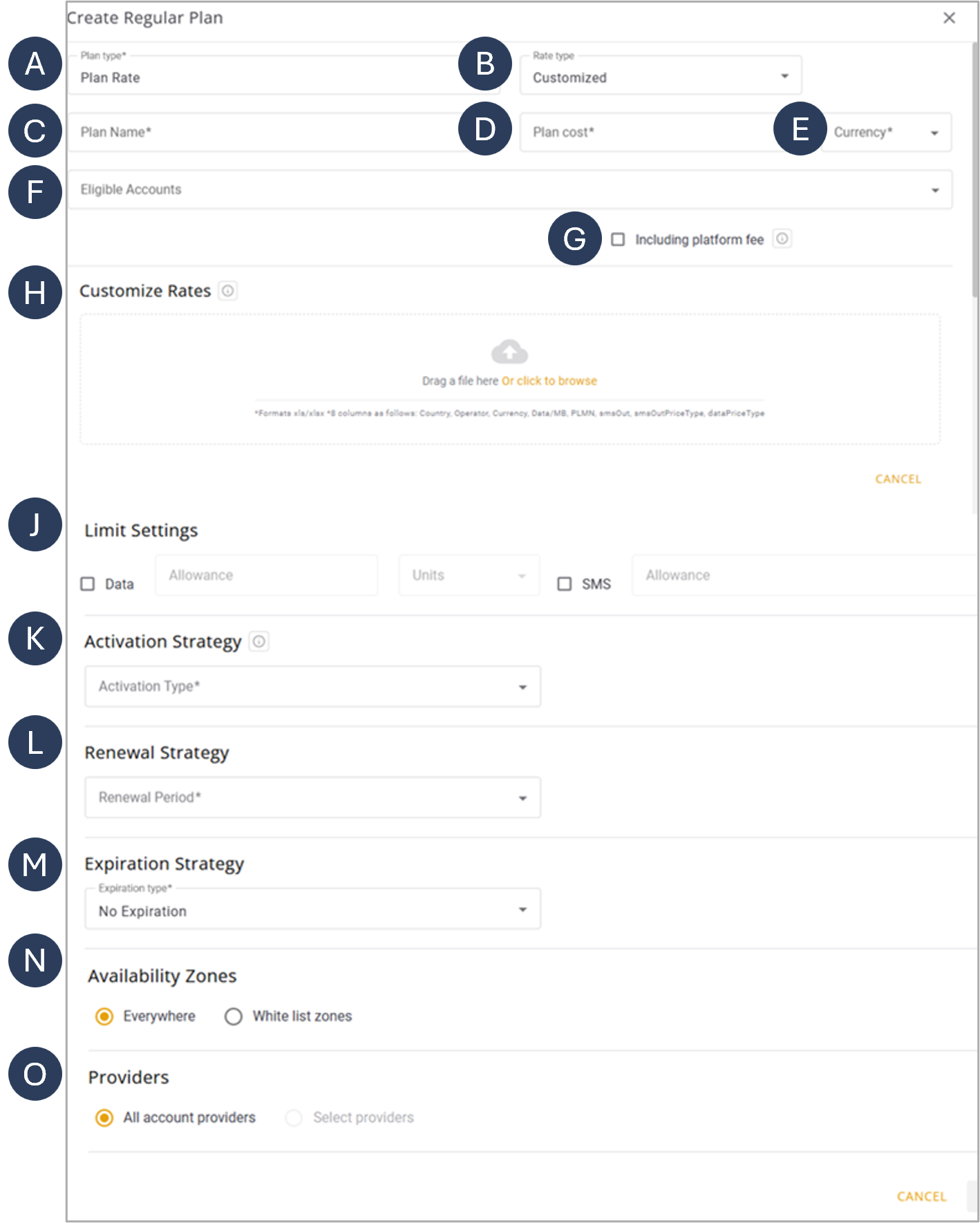
A screen capture of the Customized Plan Rate options is shown here.
Plan Parameters
A description of the Customized Plan Rate parameters is provided in this table.
| Parameter | Description | |
|---|---|---|
| A | Plan Type | The type of regular plan selected. |
| B | Rate Type | Specifies if the Rate Plan is Fixed or Customized |
| C | Plan Name | A unique identifier for the billing plan. |
| D | Plan Cost | The cost of the plan, with options to specify the currency. |
| E | Currency | Defines the plan currency. |
| F | Currency | Defines the plan currency. |
| G | Eligible Accounts | The accounts that are eligible to use the plan. |
| H | Customize Rates | Upload an Excel file containing the rates for specific countries, operators and PLMNs. |
| J | Limit Settings | Limits the usage of Data to a specified number of units or to predefined number of SMS messages. |
| K | Activation Strategy | Specifies when the plan starts. The Activation Type can be set to regular, Renewal Cycle Activity, or First Activity. Refer to Activation Strategy. |
| L | Renewal Strategy | Defines the renewal period, which can be set to Daily, Weekly, Monthly, Quarterly, Semi-Annual, Annual, or One Time. Refer to Renewal Strategy. |
| M | Expiration Strategy | Specifies the plan expiration type, which can be set to No Expiration, Fixed Date, From Offer Activation, or From Plan First Use. Refer to Expiration Strategy. |
| N | Availability Zones | Determines where the plan is available, with options for Everywhere or White-List Zones. Refer to Availability Zones. |
| O | Providers | Specifies whether all account providers are available or if specific providers are selected for the plan. |
Step-by-Step Instructions
To create a Customized Plan Rate, do these steps:
- Select Catalog |Plans from the Navigation sidebar.
- Select the Regular Plans tab.
- Click +Plan to display the Create regular Plan dialog box.
- Select Plan Rate from the list of Plan Types.
- Select Customized from the list of Rate Types.
- Type a name in the Plan Name* field.
- Specify a value in the Plan Cost* field. If you do not want to set a Plan Cost, enter 0 (zero).
- Select the Currency* from the list of options.
- Select one or more Eligible Accounts.
- Check the Including Platform Fee if applicable.
- Upload an Excel file in the Customize Rates field..
- Specify the Limit Settings for the account rate plan (optional).
- Data: Specify the plan amount limit and unit (KB, MB, GB).
- SMS: Specify the plan amount limit.
NOTE: When the limit settings are exceeded, SIM services for this plan are blocked.
- Select an Activation Strategy.
- Select a Renewal Strategy.
- Select an Expiration Strategy.
- Check the appropriate Availability Zones.
- Check the appropriate Providers option:
- All account providers: This plan can be assigned to all authorized providers listed in the Providers Module.
- Select providers: This plan can be assigned to selected providers only.
- Click Create to display the plan in the plans table.
NOTE: Any step marked with an asterisk (*) is mandatory and must be completed by selecting an appropriate option.
IMPORTANT: You can now access the SIMs Module to attach SIMs to this plan. You should note that a SIM must be attached to a plan in order to utilize connectivity services such as Data and SMS.