View Plan Details
The View Plan Info page provides a comprehensive overview of the selected plan.
To view the Plan Info page do these steps:
- Select Catalog | Plan from the sidebar.
- Select the Regular or Pool Plans tab. The Sell plans table is displayed (default).
- Scroll the table and click a plan to display the Plans Info page.
- Select the Plan Details tab to display the plan settings and parameters.
- Select the Assigned SIMs tab to display a list SIMs attached to the selected plan.
- Select the External Parameters tab to enter a parameter value.
A screen capture of the Plan Info page is shown here.
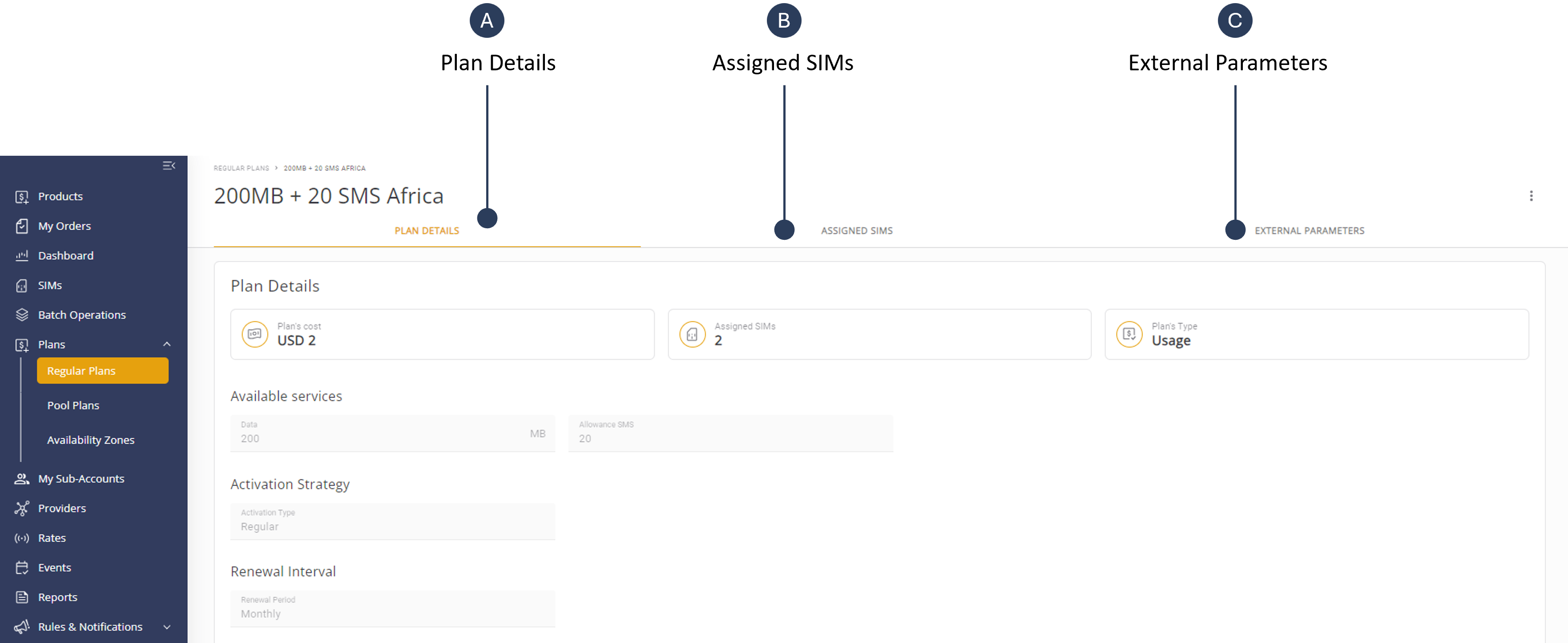
The Plan info page contains three tabs as described in this table.
| Category | Description |
|---|---|
| Plan Details | Contains information about the plan type, cost, rates, activation strategy, renewal interval. availability zones and providers. |
| Assigned SIMs | Provides a comprehensive overview of all SIM cards linked to specific plans, enabling you to track and manage these SIMs. |
| External Parameters | Contains information about user-defined identifiers mapped with platform system entities such as Accounts, SIMs, and Plans, used for managing platform entities based on user-specific identifiers. |
NOTE: The Plan Details tab is different for each type of plan because each plan has a different set of parameters and settings.