Availability Zones
An Availability Zone defines the rating and eligibility scope of a plan. The scope is the set of countries and network operators to which the rates and allowances of the plan apply. An Availability Zone does not control network access, and does not restrict, block, or steer the network on which a SIM registers.
NOTE: You can attach Availability Zones to both Regular and Pool plans.
Key Terms and Concepts
A definition of the key availability terms is provided in this table.
| Concept | Definition |
|---|---|
| Availability Zone | Defines the rating and eligibility scope of a plan. The scope is one or more countries and their network operators. The plan rates usage on a network in the Availability Zone. The plan does not cover usage on a network outside the Availability Zone. An Availability Zone does not affect network registration, attachment, or selection. |
| Country Zone | A named selection of one country and one or more of the network operators in that country. You must assign a Country Zone to a Zone Group before you can use the Country Zone in a plan. |
| Zone Group | A named set of one or more Country Zones. You attach a Zone Group to a plan. The Zone Group sets the countries and network operators for which the plan covers usage. |
Availability Zones and Network Selection
An Availability Zone does not steer a SIM to a network, and does not influence network selection. If a SIM is in range of a network outside the Availability Zone of its plan, the SIM can still register on that network. The plan gives no coverage on that network, and the SIM has no usable data allowance. The SIM cannot move automatically to a network in the Availability Zone. If a network outside the Availability Zone is the only network in range, the SIM has no service and no fallback.
IMPORTANT: Use Steering Trees to control the networks on which a SIM can register. For example, Steering can block a specific operator. An Availability Zone defines coverage eligibility, not network access.
How to Create an Availability Zone
The workflow to implement Availability Zones is displayed in this diagram.
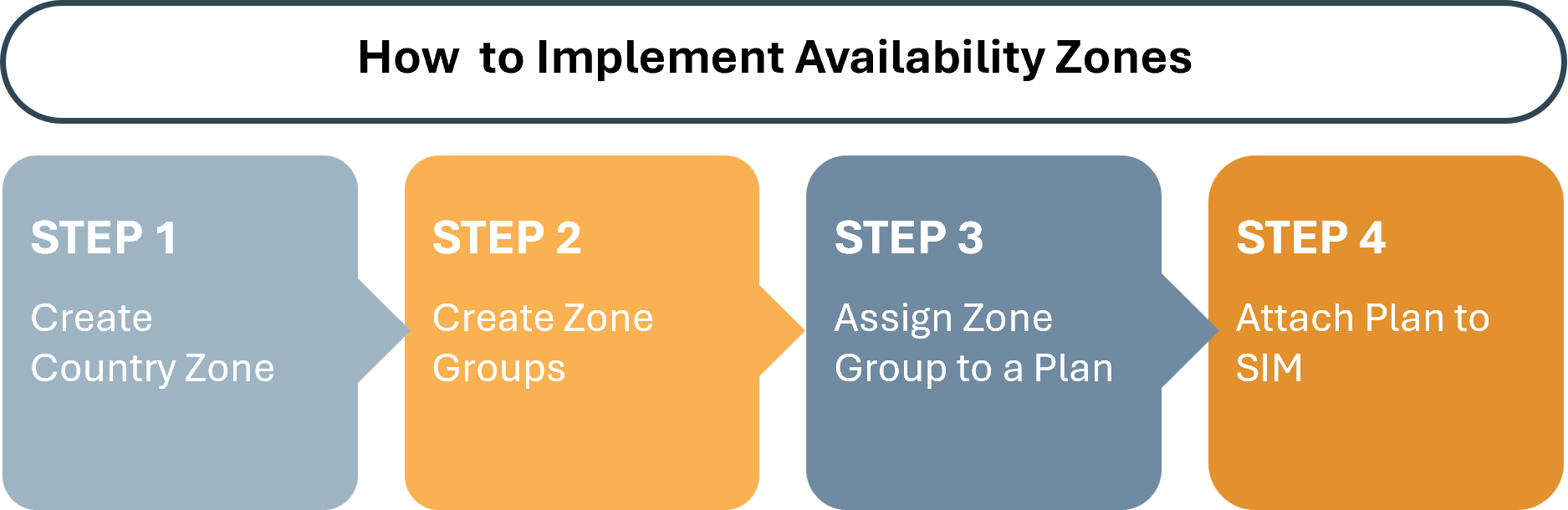
NOTE: The system contains a predefined list of all countries. In Step 1, the Create Country Zone procedure lets you add or change the network operators for a country.
To implement Availability Zones, do these steps:
- Step 1: Create Country Zone.
- Step 2: Create Zone Groups.
- Step 3: Assign Zone Group to a new or existing plan.
- Step 4: Attach the plan to a SIM.