My Sub Accounts
The CMP Sub Account Module enables users to create and manage sub-accounts linked to a parent account. These sub-accounts enable customers to segment and delegate control over specific sets of SIM cards or connected devices.
The Sub-Accounts module contains a table that displays a comprehensive list of all sub-accounts defined within your account. This table serves as a centralized repository for managing and organizing sub-accounts, providing key details for easy reference and management.
Here is an example of the Sub-Account table.
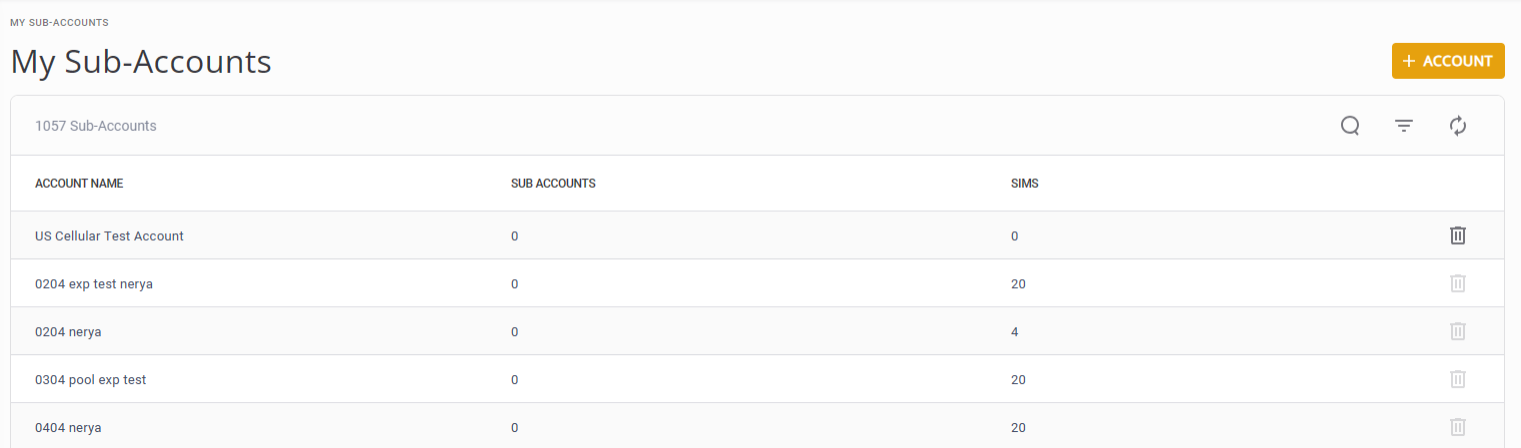
The Sub-Account table contains these columns:
|
Column Name |
Description |
|---|---|
|
Account Name |
Displays the name of each sub-account, providing a clear identifier for easy recognition and reference. |
|
Number of Sub-Accounts |
Indicates the number of sub-accounts associated with each account. This count helps users gauge the level of segmentation and hierarchy within the account structure. |
|
Number of SIMs |
Specifies the total number of SIM cards associated with each sub-account. It provides insights into the scale and scope of connectivity resources managed under each sub-account. |
The platform supports four account levels, root account and three sub-account levels below the root account. If your account is at sub-account level four, you cannot create a new sub-account of your own and the +ACCOUNT option is not displayed.
Basic Account Parameters
To create a new account, you need to define these parameters to identify the account.
- Required: Account Name, Currency, Name of Provider(s) and account security settings
- Optional: VAT Identification, and Billing Cycle definition
IMPORTANT: Providers that are not selected for this account will be blocked from usage.
Account Restrictions
When you create an account, you can apply these restrictions:
- Allow customer to attach SIMs to Buy Plans: This option enables the customer to attach SIMs to a Billing Plan created by the Parent account.
- Display SIM account hierarchy: This option is restricted to root and MNO accounts. When the parent account activates this option, the sub-account can view the complete SIM hierarchy from the new sub-account down (to a maximum fourth level). When the root account doesnot activate this option (default setting), the sub-account can only view the SIM hierarchy down one level to its child account level.
NOTE: When you create the new account, the system sets invoice configuration parameters to their default values.