To remove unused default APNs:
-
Disable the MBN file:
The MBN file is a package for dedicated operators, like AT&T, Verizon, etc.
AT+CFUN=0
AT+QMBNCFG="list"
AT+QMBNCFG="Autosel",0
AT+QMBNCFG="Deactivate"
AT+QMBNCFG="list"
and restart
AT+CFUN=1,1
-
Check if there are wrongly configured APNs:
AT+CGDCONT?
+CGDCONT : 1,"IPV4V6","br oadband","0.0.0. 0.0.0.0. 0.0.0.0. 0.0.0.0.0",0,0,0
+CGDCONT : 2,"IP","attm2m global","0.0.0.0 ",0,0,0
+CGDCONT : 3,"IP","m2m.co m.attz","0.0.0.0 ",0,0,0
-
Remove all non-floLIVE APNs:
AT+CFUN=0
AT+CGDCONT=<ID>
AT+CFUN=1,1
where <ID> in the argument AT+CGDCONT=<ID> is the Context number; for example, AT+CGDCONT=3 will remove the third predefined APN.
-
Set the floLIVE APN (for example, gigsky-02):
AT+CGDCONT=1,"IP","gigsky-02"
Check the SIM's last-used IMEI. The SIM IMEI is shown in the General Info Area in the SIM Info Page. The IMEI identifies the device model/type.
You can also use online services, such as https://www.imei.info, to resolve the IMEI to the device model.
Do the following to create a new APN:
-
Settings > Cellular > Cellular Data Network > Cellular Data.
-
the APN field and enter the APN Name, for example gigsky-02.
-
Go back to Settings.
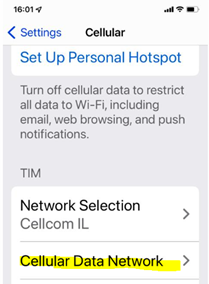
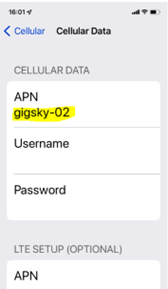
Do the following to create a new APN:
-
Settings > Connections > Mobile Networks.
-
Enable Data roaming.
-
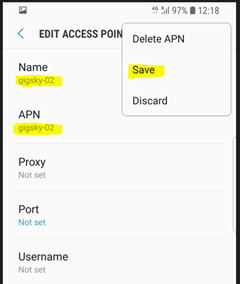
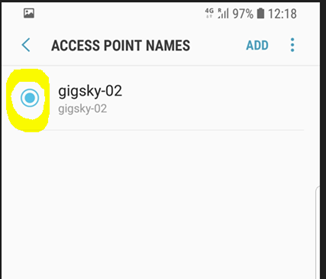
Click Access Point Names and click Add to open the access point menu.
-
Click Name and enter a name, for example gigsky-02.
-
Click APN and enter an APN name, for example gigsky-02.
-
Click Save in the menu options.
-
Select the newly created APN.
-
Close the Access Point Names menu.
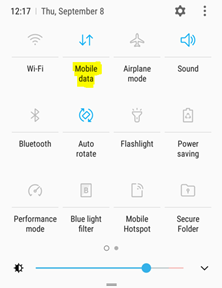
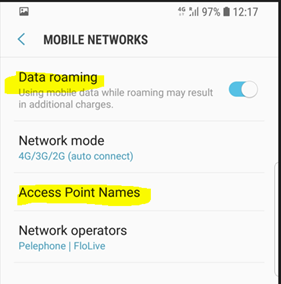
The Registration of a roaming SIM card may take longer than a local IMSI SIM at initial registration because the roaming IMSI is doing a search for the best available network to connect to the first time it is connected in a new country.
Check the modem bands.
Yes. The data and events on the portal are received from the network and immediately processed and displayed in the relevant portal modules.
The Events page of a single SIM or for all SIMs in an account can be filtered by the relevant network-element events (HLR/HSS in this case).